
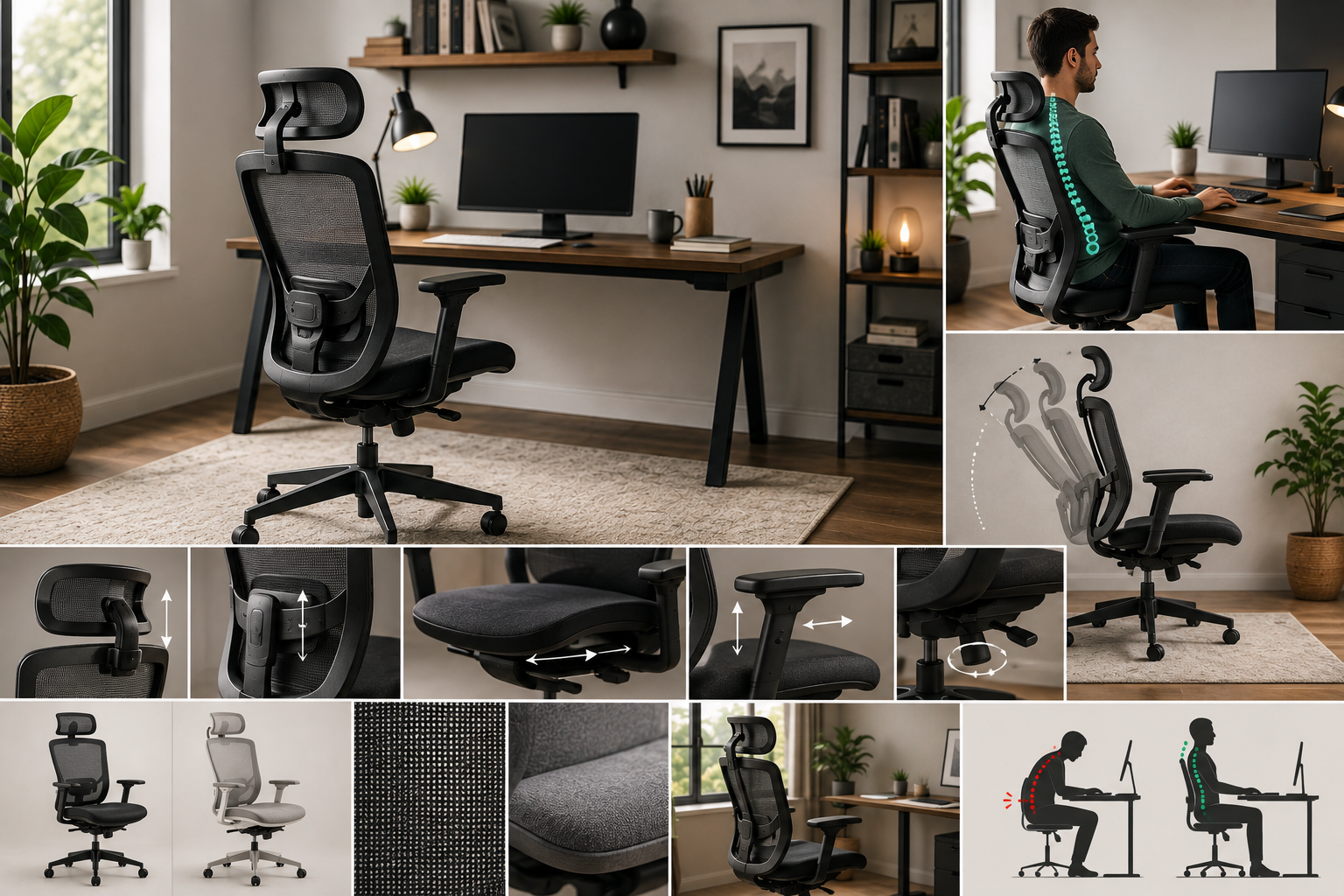
If your back, neck, or shoulders ache by mid-afternoon, your chair is probably more responsible than you think. A home office chair isn’t just furniture it’s the single piece of equipment your body interacts with for hours every single day.
A truly ergonomic chair should offer adjustable seat height, seat depth, lumbar support, armrests, and backrest tilt at minimum. It should let your feet rest flat on the floor, your knees sit at roughly 90 degrees, and your lower back stay supported in its natural curve. Beyond that, the “best” chair depends on your body size, how many hours you sit, and whether you prioritize breathability or cushioned comfort.
This guide walks through exactly what makes a chair ergonomic, which features matter most, and how to choose confidently without falling for marketing terms that don’t actually mean anything.
Why “Ergonomic” Isn’t Just a Marketing Word
The word “ergonomic” gets slapped on a lot of office chairs that don’t really earn it. A chair is only genuinely ergonomic if it can actually adjust to fit your body not the other way around.
At minimum, a real ergonomic chair should offer these five points of adjustment:
- Seat height
- Seat depth
- Lumbar support (height and/or tension)
- Backrest tilt or recline
- Armrest height and position
If a chair is missing several of these, it may look supportive but won’t actually adapt to your body over long sitting sessions which is the entire point of ergonomic design.
The Core Features That Actually Make a Chair Ergonomic
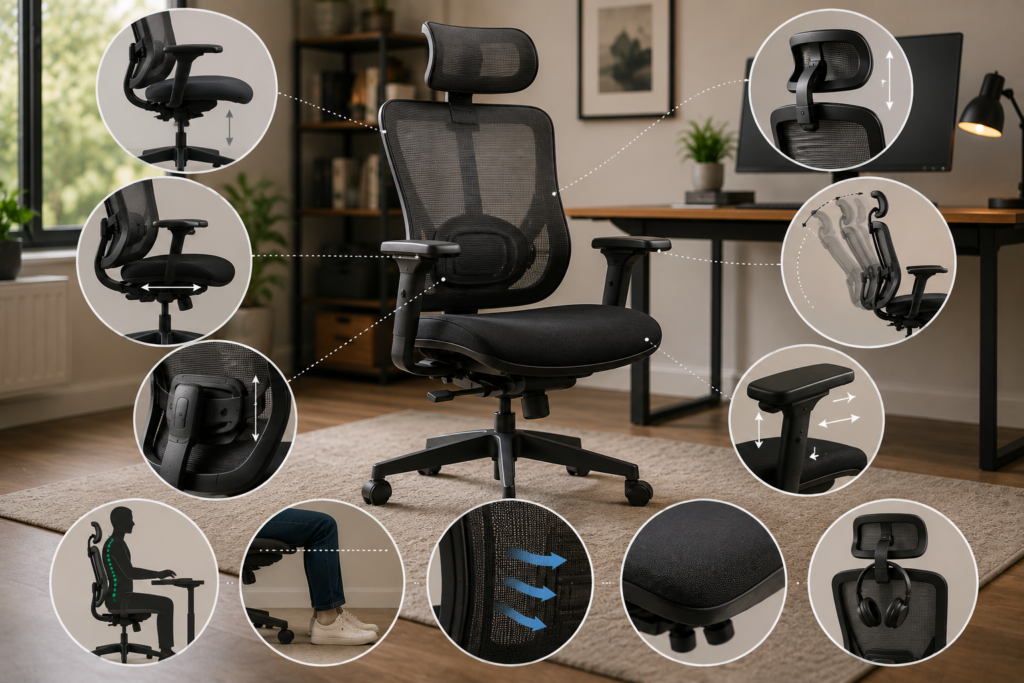
1. Adjustable Seat Height
Seat height affects your knees, hips, and how well your feet sit on the floor. Most adjustable chairs offer a seat height range of roughly 19 to 24 inches off the floor, controlled by a pneumatic lever.
What proper seat height looks like:
- Feet flat on the floor (or on a footrest if you’re shorter than average)
- Knees at approximately a 90-degree angle
- Thighs roughly parallel to the floor, not tilted up or down
If you’re notably tall or short, pay close attention to a chair’s seat height range before buying not every “adjustable” chair accommodates the full range of body heights.
2. Seat Depth
Seat depth is one of the most overlooked features, but it matters just as much as height.
When you sit all the way back in the chair, there should be a small gap roughly 2 to 4 inches between the front edge of the seat and the back of your knees.
| Seat Depth Issue | What Happens |
| Too deep | Presses into the back of your knees, restricting circulation |
| Too shallow | Fails to support your thighs, causing you to perch on the edge |
| Properly adjusted | Full thigh support with knees clear of the seat edge |
Some chairs offer sliding seat depth adjustment; others come in different frame sizes to fit different body proportions.
3. Lumbar Support
Your lower back naturally curves inward, and sitting for long periods without support flattens that curve which is a major contributor to lower back fatigue and pain.
Look for lumbar support that adjusts in:
- Height — so it lines up with the curve of your specific lower back, not a generic average
- Depth or tension — so the amount of pressure feels supportive, not intrusive
A fixed lumbar bump can work if it happens to match your body, but adjustable lumbar support is far more reliable across different heights and torso lengths.
4. Backrest Tilt and Recline
Staying frozen in one position all day isn’t good for your spine, even in a perfectly adjusted chair. A backrest that reclines or tilts allows gentle movement throughout the day, which helps reduce stiffness.
Common recline options:
- Tilt tension control — adjusts how much resistance you feel when leaning back
- Locking recline positions — lets you lock the backrest at a specific angle
- Synchro-tilt — the seat and backrest move together at a coordinated ratio, keeping your feet grounded as you recline
5. Armrests
Armrests that don’t fit your body can pull on your shoulders and neck rather than relieving pressure. At minimum, look for height-adjustable armrests; many ergonomic chairs also offer width and pivot adjustment.
Proper armrest height should let your elbows rest at roughly a 90-degree angle, with shoulders relaxed not hunched up or dropped down.
6. Headrest (Optional but Useful)
Not essential, but a cushioned, height-adjustable headrest can reduce tension in the neck and upper shoulders, especially if you recline frequently or spend long hours on video calls.
Mesh vs. Cushioned (Foam) Chairs: Which Is Better?
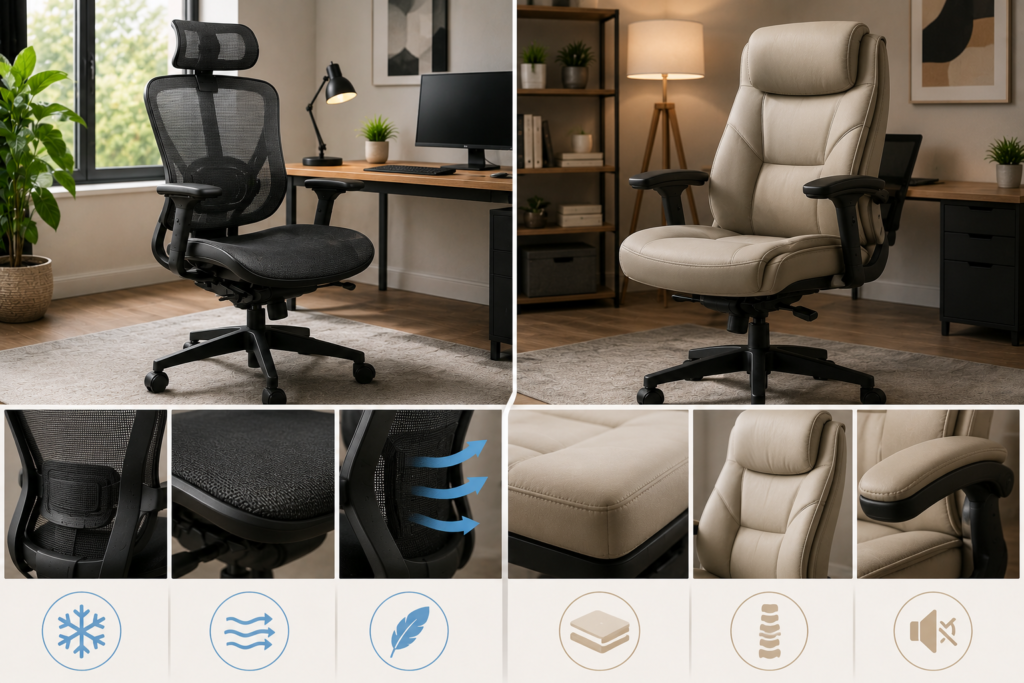
Material affects both comfort and temperature regulation, and there’s no universal winner it depends on your priorities.
| Feature | Mesh Chairs | Cushioned/Foam Chairs |
| Breathability | Excellent promotes airflow | Lower can trap heat |
| Initial Comfort | Firmer, more supportive feel | Softer, plusher feel |
| Long-Term Cushioning | Less padding over time | Retains cushioning longer if high-density foam |
| Best For | Warm climates, long sitting hours, hot sleepers | Cooler climates, those who prefer a plush seat |
| Durability | Mesh can stretch or sag over years of heavy use | Foam can compress and flatten over time |
Practical takeaway: If you tend to run warm or sit for 6+ hours a day, mesh is usually more comfortable long-term. If you prioritize a cushioned, plush feel, high-density foam is a solid choice just check that it’s dense enough to resist flattening.
Chair Frame Sizing: Why “One Size Fits All” Doesn’t Really Work
Many ergonomic chairs are now offered in multiple frame sizes typically small, medium, and large to better accommodate different heights and weights.
- Smaller frames suit shorter users or lighter body types, offering a more proportional fit and lower seat height range.
- Larger frames suit taller or heavier users, typically offering a wider seat, taller backrest, and higher weight capacity.
Before buying, check both the seat height range and the weight capacity listed by the manufacturer a chair rated for the wrong body size won’t provide proper support, regardless of how many adjustment features it has.
Manual Adjustment vs. Self-Adjusting Chairs
Most ergonomic chairs fall into one of two categories:
Manual Adjustment Chairs
These use levers, knobs, and dials to fine-tune seat height, tilt tension, lumbar depth, and armrest position individually.
Best for: Users who want precise, personalized control over every setting.
Self-Adjusting (Weight-Responsive) Chairs
These use a weight-sensitive recline mechanism that automatically adjusts tension based on your body weight and movement, without manual levers.
Best for: Users who want effortless support without configuring multiple settings good for shared workstations or those who don’t want to fuss with adjustments.
Both approaches can deliver strong ergonomic support the right choice depends on whether you prefer hands-on customization or automatic simplicity.
How Many Hours You Sit Should Shape Your Decision
Not everyone needs the same level of chair investment. Consider your actual daily sitting time before deciding how much to spend or how many features to prioritize.
| Daily Sitting Time | What to Prioritize |
| Under 4 hours | Basic adjustability (seat height, backrest angle) is often enough |
| 4–6 hours | Adjustable lumbar support and seat depth become more important |
| 6–8+ hours | Full adjustability, breathable material, and a properly fitted frame size matter most |
If you’re sitting most of the workday, it’s worth investing in a chair with more complete adjustability rather than a basic model the cost difference is usually small compared to the impact on daily comfort.
Practical Buying Advice: How to Choose With Confidence
- Measure your desk height first. Your chair needs to pair correctly with your desk so your elbows and wrists stay in a neutral position while typing.
- Check the seat height range against your body, not just the chair’s general size label.
- Prioritize adjustable lumbar support over a fixed lumbar bump, especially if multiple people will use the chair.
- Test the seat depth if possible this is one of the most commonly overlooked but important fits.
- Choose material based on climate and sitting habits, not just appearance mesh for breathability, foam for plush comfort.
- Don’t assume “ergonomic” on the label means it fits you. Check the specific adjustment points before buying, especially seat height range and lumbar adjustability.
- Factor in weight capacity and frame size, especially if you’re outside the average height and weight range most standard chairs are built for.
Choose a Chair That Adjusts to You
The best ergonomic office chair isn’t the one with the most features on the box it’s the one that actually fits your body and adapts to how you sit. Focus on the fundamentals: seat height, seat depth, lumbar support, tilt, and armrests. Everything else material, frame size, self-adjusting mechanisms should be chosen based on your specific comfort needs and how many hours you spend at your desk.
Take the time to check real adjustment ranges before you buy, not just the word “ergonomic” on the label. A chair that truly fits you will make a noticeable difference in how you feel by the end of the workday and that’s a difference worth investing in.
FAQ
1- What’s the single most important feature in an ergonomic chair?
There isn’t just one seat height, lumbar support, and even weight distribution work together. But if you had to prioritize, adjustable lumbar support tends to have the biggest impact on reducing lower back fatigue during long sitting hours.
2- Do I need a mesh chair, or is cushioned fine?
Both can be ergonomic. Mesh is generally better for breathability and long sitting sessions, especially in warmer climates, while cushioned chairs offer a softer, plusher feel that some people simply prefer.
3- How do I know if a chair’s seat height will work for me?
Check the manufacturer’s listed seat height range (commonly 19–24 inches) against your own height, and confirm your feet can rest flat on the floor with your knees at roughly 90 degrees when seated.
4- Is an expensive chair automatically more ergonomic?
Not necessarily. Price often reflects material quality, adjustability range, and durability, but a chair is only ergonomic if its adjustments actually fit your body a moderately priced chair that fits you well can outperform an expensive one that doesn’t.
5- Can an ergonomic chair fix existing back pain?
An ergonomic chair can reduce strain and support better posture, which may ease discomfort caused by poor sitting habits. However, it isn’t a substitute for medical advice if you’re experiencing ongoing or severe back pain.
6- How often should I replace my office chair?
There’s no fixed timeline, but watch for reduced cushioning, sagging mesh, wobbly mechanisms, or parts that no longer hold adjustment these are signs the chair is no longer providing reliable support.